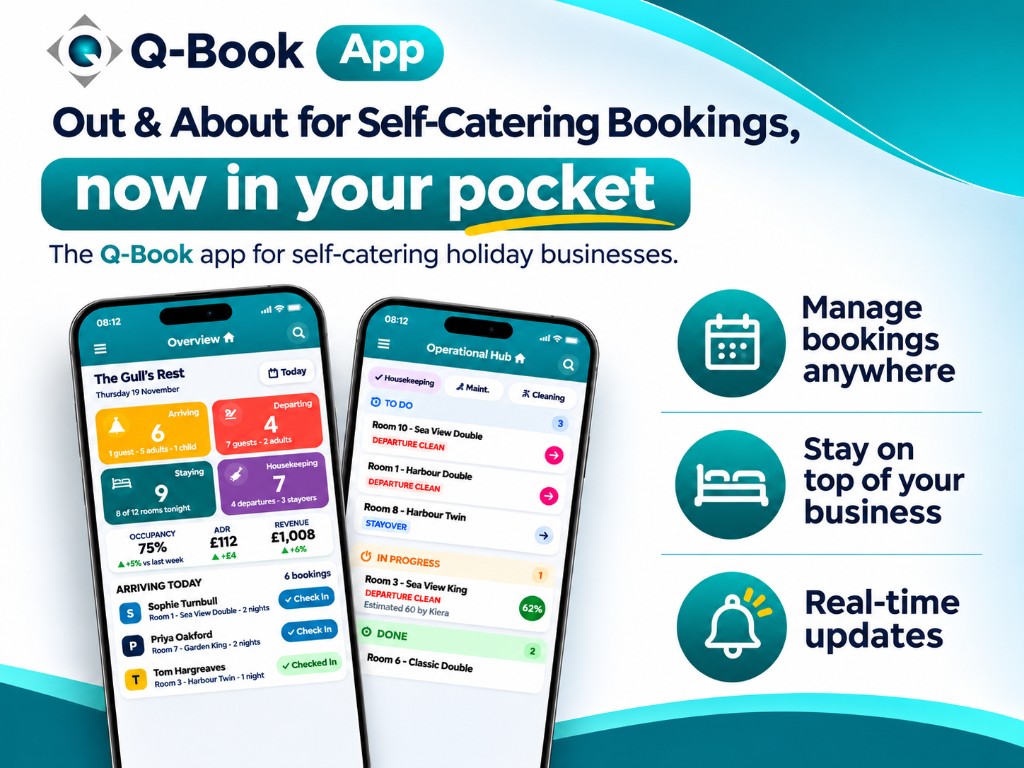
Manage bookings anywhere
Arrivals, departures, new bookings and the live calendar stay with you, whether you are on the way to the shops, out for lunch, or anywhere else away from the property.

Q-Book self-catering app
The Q-Book app for self-catering holiday businesses. See who is arriving, keep changeovers moving and message guests while you are away from the office.
Why owners use it
Built for the day-to-day work of cottages, apartments and holiday homes, not for sitting in the office all morning.
Arrivals, departures, new bookings and the live calendar stay with you, whether you are on the way to the shops, out for lunch, or anywhere else away from the property.
Changeover cleans, maintenance and catering sit on one live board, so you can see what is to do, in progress and done.
Balances, colour labels, guest messages and review replies update as the day moves, so the phone in your pocket matches the changeover list.
What is in the app
The same Q-Book self-catering information you already trust, laid out for a phone.
Open the day and see which properties are arriving, departing and still to be cleaned.
Change the calendar to suit the way you work, then act on a booking without going back to the desk.
One place for the details your team asks about when guests arrive for their stay.
Deal with money while the guest is with you, instead of promising to send something later.
Guest Chat, announcements and the Review Hub live in the same app as the booking.
More than one property? Keep every calendar under the same login.
Change what the next arrival will pay, while you can still see which properties are free.
Give each person their own login, and only the parts of Q-Book they should see.
Housekeeping, maintenance and catering
A live status board your team can use between changeovers.
Tasks sit on an interactive board, so a property moving from departure clean to ready is visible without a call back to the office.
Create a team such as Morning Housekeeping, assign staff to it, and everyone sees the same live board.
Coming soon
Tailor your own reports from the app. Smart Reports are on the way and are not available yet. Bookings, housekeeping and payments are ready to use now.
Out and About is ready for Q-Book self-catering customers today, completely free of charge. Sign in with the app login you already use.
Open the Out and About appQuestions owners ask
Straight answers for cottages, apartments, holiday homes and holiday lets.
Out and About is the Q-Book app for self-catering cottages, apartments and holiday homes. It puts arrivals, departures, the calendar, housekeeping, payments and guest messages on your phone, so you can run the business while you are away from the office.
Yes. Out and About is completely free for Q-Book customers. There is no additional charge for a cottage, apartment or holiday home business to start using it.
It is for Q-Book customers who run self-catering cottages, apartments, holiday homes and holiday lets.
The overview lists arrivals, departures, guests currently staying, new bookings and housekeeping cleans due. A date control lets you move between days. You can also see outstanding balances and live custom colour labels for each cottage, apartment or room.
Yes. You can check guests in and out, print or email invoices, and view, email or print guest registration forms.
Yes. Open a guest to view or add notes and additional services. You can also search for a guest from the app.
The calendar is live and adjustable. You can change its size and colours, and switch between a list view and a month view. Add a quick booking or a full booking with pre-populated prices, move or swap bookings, cancel a booking, and block or unblock a cottage, apartment or room one at a time or in bulk.
Yes. You can view live pricing, search for bookings and open the booking information.
The booking summary shows guest details, special requests, additional services and the guest registration form. You can amend the booking from the summary.
You can check balances, take a payment, make a refund, send a payment link, and create and send an invoice.
Yes. You can send a pre-set message or write your own. Guest Chat also lets you reply to an ongoing message thread.
Yes. You can send an important announcement to guests, for example a road closure, directly from the app.
Yes. The Review Hub lets you reply to reviews from Q-Book, Booking.com, Airbnb, Expedia and other connected platforms from your phone.
Q-Switch is for businesses with more than one cottage, apartment or holiday home. You can switch between calendars and view more than one property calendar side by side from a single login, without a separate browser session for each property.
Yes. You can override base rates, change last-minute rates and restrictions, and set rates plus minimum or maximum stays for bank holidays and special events. You can also restrict check-in and check-out days, close out rates on set dates, and apply changes over a date period or in bulk while you view live availability.
Yes. Staff Access lets you create an individual user account for each person and restrict that account to the features, actions and sections they need.
The Operational Hub is a live board for housekeeping, maintenance and catering. Tasks move through To do, In progress and Done. You can invite cleaners and maintenance staff to their own task board, create teams such as Morning Housekeeping, assign changeover cleans, and let staff add tasks, comments and reminders.
The staff task board works as a to-do list while restricting guest personal information, your business information, reports and payments. Staff see the tasks they need to do.
Yes. You can report a problem, such as a leak or a broken appliance, to maintenance straight away. The hub also helps you manage stock, inventory and priorities, and keeps the team informed.
Smart Reports, where you tailor your own reports, are coming soon. They are not available in the app yet.
Open the Out and About app and start using it today. It is included for Q-Book self-catering customers at no extra cost. If you are not with Q-Book yet, join first and the app is then free to use.
Yes. Out and About is for the self-catering businesses Q-Book already looks after, including cottages, apartments, holiday homes and holiday lets.
No matching questions. Try another search, or contact the Q-Book team.
Free for Q-Book customers
Sign in to the Out and About app and take bookings, changeovers and guest messages with you. New to Q-Book? Join first, then the app is yours at no extra cost. It is included for self-catering businesses.